Article

Manage user groups and permissions with YAML in Django
By Mike Dingjan

Written by
Michael van Tellingen
At Lab Digital building secure software runs through our veins. So much that sometimes we forget talking about it and kind of take for granted what we do in this area. In light of that we’ve written down our current security approach for MACH projects.

Proper security is essential to mitigate unacceptable risks to businesses and its software users, whether they are employees or customers. The potential damages and reputation losses from an incident could bankrupt companies.
Secure software delivery is difficult and touches every aspect of the organisation that creates the software, including suppliers and clients. To do this for composable software delivery is even more challenging, as the amount of organisations and systems you interact with grows exponentially and your attack surface grows with that.
You need to apply advanced practises and techniques at several levels of your software development approach as well as organisation, to keep this under control. Through standardisation and discipline you can create a properly secured stack, that is at the same time a breeze to work with.
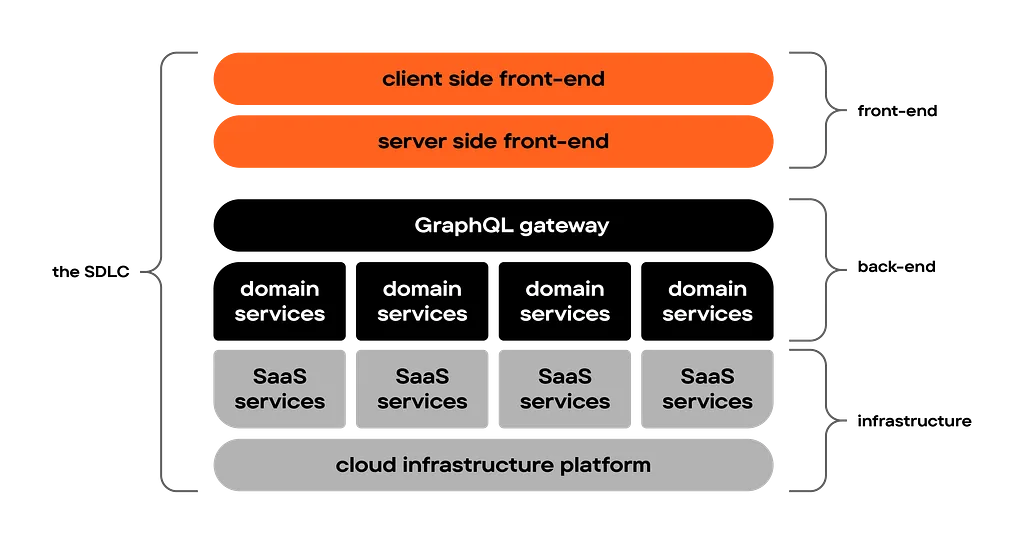
In this article we’ll dive into the technical security aspects of the software delivery life cycle for MACH projects. Every bullet point could be its own blogpost, but we’re focussing on the high level for now to keep it readable. We won’t focus on the organisational side of security — i.e. ISO27001/ISMS — this is food for another blogpost.
Of course we’re interested in learning how other companies approach this, so feel free to reach out to us or comment on the article to discuss!
When setup well, a good software delivery lifecycle prevents security risks and vulnerabilities to end up in production (“shifting left”) as much as possible, while at the same time providing a fluent developer experience that is fast and productive.
We use advanced source code management platform GitHub Enterprise. Next to many productivity tools, GitHub offers an enormous amount of tools to secure your software development pipeline.
Through GitHub advanced security we implement static code analysis that catches insecure coding patterns for us and even suggests alternative approaches that are more secure. We also looked at snyk.io as an alternative, but we’ve opted for the ‘GitHub integration’ solution, to reduce the additional cognitive load of ‘another tool’.
We use tools like GitHub Safe Settings to apply organisation wide policies for our source code repositories.
Something that has absolutely no place in source code are (plaintext) secrets or passwords. Any runtime secret will be stored in a secrets store at a cloud provider, but sometimes secrets are needed as part of the code for local development or infra pipelines. In such cases, we use the encryption tool SOPS to encrypt our secrets and store them security in source control, or a password manager such as 1Password.
Passwords a team requires to access the tools we use (if no SSO is available), will be stored in a password manager such as 1Password. These offer CLI tools as well, which makes it easy to provide a proper developer experience. This is also used to provision testing credentials for local development via .env files.
Through AzureAD/Entra ID we implement Single-Sign-On for all the tools we use. From Github to AWS, to the SAAS platforms we integrate with. When possible, SSO is implemented so that you don’t have to use a password to login most of the time.
Supply chain security is an important aspect of remaining secure. By pinning dependencies to a specific version we avoid new versions becoming part of our software without we notice. By using tools such as Dependabot and Renovate we have automations in place to update dependencies intentionally and are notified of possible insecure versions we use.
Immutable deployments with Docker ensure that what you build and test in you CI/CD pipelines, is what is actually ran in production. We don’t install any dependencies or build packages as part of a deployment to any of the environments.
Through the use of OIDC in CI/CD pipelines, we can secure access to 3rd party services like AWS and GCP. This completely eliminates the need for developers to manage credentials for accessing these platforms in a CI/CD pipeline.
Implementing the 12 Factor Methodology results in many benefits for security. Especially its factors like environment parity, how you deal with configuration, how you manage dependencies and disposability of environments improve security enormously.
There are probably many more aspects we implement in our SDLC to improve security, and this is evolving and improving on a daily basis. But these are the main topics we implement.
One thing that stands out in our view, is the focus on using common patterns and practises that are widely known and well documented, preferably open source. This brings many benefits. Don’t invent the wheel yourself!
Modern infrastructure is created in the cloud and managed through modern practices like infrastructure as code and immutable deployments and centrally collecting data in a SIEM. At Lab Digital we have standardised playbooks for rolling out best practice infrastructures for MACH projects to any of the popular cloud providers.
We use infrastructure as code to manage the setup and configuration of all our cloud environments. This makes it easy to collaborate on projects, but also ensures consistency across environments and compliance to centrally managed core modules that implement security best practises, next to serving as an ‘audit log’ for changes.
Role based access control ensures that applications don’t need credentials (that can leak) to access external resources in the cloud.
Any secret used at runtime is stored in a designated secrets management solution to the cloud.
2 Factor authentication is required for all access to any infrastructure resource. Not only when interacting with a management console, but also when using CLI applications from a developers workstation. Tools like aws-vault help with preventing the need for local credentials, integration with SSO and providing 2FA from the command line as well.
Encryption is implemented everywhere. From hosting everything through SSL/TLS with certificates that are automatically deployed, to encrypting workloads in-transit traffic and at rest, including backups for databases for example.
We implement tight and least-privilege driven access control through IAM services in the available cloud providers, ensuring that should credentials leak or an application is compromised, the ‘blast radius’ is limited.
We separate environments at the cloud account level, meaning that test, QA and production environments are completely isolated from each other and access is only granted when needed. This follows the best practises that cloud providers prescribe.
Within accounts, we only expose services to the internet if they absolutely need to. Most of the times they are deployed within VPC subnets with tight control over internet access through NAT Gateways.
Internal, service to service traffic within our VPCs is always encrypted and secured by API tokens.
By leveraging public facing services of cloud providers, such as load balancers and CDNs we ensure our applications are protected for DDoS attacks and have facilities to for example implement throttling.
Public facing endpoints can be protected by Web Application Firewalls (WAF), which give you more control over implementing specific rules to protect your applications.
We don’t roll our own end-user authentication & authorisation, but rather rely on either a service that provides this, or a mature open source module and supports standards based auth, including the ability to 2FA for your users.
OAuth2 with JWTs are the golden standard for building a token infrastructure for your MACH platforms. You do need to implement this properly of course, but when done so it is super powerful. We use it in all of our implementations
The OWASP10 covers a large part of secure software development practises you should apply. We cover it by the many practices we apply and often use it as a sanity check.
All connections in our systems are made over HTTPS and configured to make sure that clients only connect via HTTPS through proper HSTS configurations.
Cookies need to be secure and domain specific, so that they can only be sent over encrypted connections and can’t be read by any 3rd party tags you might have on your website (and which might be compromised).
All APIs are secured through user specific JWT tokens, or in case of server to server communications, through a different token mechanism. In practice, most of the time we can leverage end user tokens for this that are often refreshed.
Database access is managed through providing access tokens only at runtime and ideally through the use of roles assigned to applications. This ensure that there are no usernames and passwords that can be used, and production access that’s tightly controlled.
Logging and observability is implemented at several levels of the stack and might lead to sensitive information to leak. We take active care to prevent this and use systems that incorporated measures to prevent this as well.
Through CSRF protection we ensure that whenever a request is made to your application backed, the user is actually browsing the website and not a 3rd party site that invokes requests to you website, potentially stealing information.
Through Content Security Policies (CSP) we control which resources a webpage can load from which domains. This ensures that in case your site is compromised, it can’t execute any code from a different domain, that might steal information from the user (i.e. access tokens).
We implement stringent input validation to prevent cross site scripting (XSS). This ensures that it is impossible to inject JavaScript into the website that potentially allows an attacker to steal information from the user.
We prevent cloud or SAAS tokens to leak to the front-end, but make sure we have our own token implementation that encapsulates these. We found that SAAS tokens meant for public usage are often not restrictive enough and leak information that we don’t want to leak. Also we want to prevent these tokens to be used to directly access the underlaying SAAS systems.
We’re careful with caching. Especially preventing to cache user specific information. When also using a CDN, this might lead to cookies being cached as well, which might lead to users being logged in as someone else.
It might be an open door, but something that we’re very deliberate about is the use of proven open source tools and frameworks as the building blocks for our projects.
We’ve noticed that these are often highly secure and when a security incident happens in these projects, often there is a proper responsible disclosure process, next to the quick turnaround times for fixing it.
Having these ‘10.000 eyes’ on those projects means that there is a high probability of someone noticing something and take action. We’ve seen this recently with an advanced supply chain attack by a state actor, which was exposed by an open source developer.
Examples of highly mature and secure open source projects we use daily, are:
Django & Django-REST-Framework for building custom web applications and web services in Python
ExpressJS for building back-end applications in NodeJS
ReactJS for building scalable front-ends and design systems
NextJS for building front-end web applications and server side rendering
Apollo GraphQL for building GraphQL services and Federation gateways
Terraform for managing configuration of virtually any cloud or SAAS environment (including MACH services like commercetools)
Docker for deploying any application anywhere
By using these projects, we can rely on foundations that have been developed and tested for decades by thousands of developers, and are in production at thousands of companies. So we’re in good company. Don’t invent the wheels yourself!
Of course we don’t start from scratch for each project we start. In fact, we try to reuse as much as we can as often as possible, because through our internal platforms (like Evolve and MACH composer) and boilerplates we can ensure a solid and sane baseline of security in all of our projects. And every new project improves our internal standards.
Next to consistency in projects, there is another benefit this approach yields: automation of a lot of the tasks of setting up new projects. This saves a lot of time and brings a lot of speed; both initially as well as later in the project, when executing maintenance tasks across projects.
Working from these standards allows us to be quite comprehensive about security and have room for ‘details’ and ‘edge cases’ that undoubtedly arise within projects.
When incidents happen, which is a matter of “when” not “if”, our standards allow us to move fast. A couple of years ago, when the Heartbleed vulnerability was published, we managed to replace around 150 servers across 50 clients in under 4 hours, all because everything was automated and we could simply push the required upgrades automatically.
So while reading our approach to security, it is important to realise that this can only exist because of our structured approach to building software. Having this standard approach ensures we continuously learn and improve. Again, don’t invent the wheel!
While building modern cloud native systems allows you to ‘offload’ much of the security aspects to 3rd party platforms, integrating all of these and keeping things secure is still serious business.
At Lab we’ve incorporated security in every step of the software delivery chain to make sure that we build secure software by default. Of course there are findings after PEN tests, but in general, we cover 95% through our default practises. In continuous delivery organisations that deploy to production many times per day, we believe this is the only way.
Preventing to invent our own wheels whenever we can ensures that we mostly rely on building blocks that have been thoroughly tested and run in production in thousands of cases, by at least as many people. Not Invented Here is to be avoided at all costs, though sometimes you do need to invent stuff yourself if it doesn’t exist. But it should only be done in those rare cases it doesn’t.
Having internal standards that incorporate security best practises helps you stay consistent and productive across projects, and allows you to become better over time instead of beginning from scratch for new projects or client engagements.
Much of it comes down to the culture of a software engineering team though, where building high quality, secure software is valued intricately by everyone involved. This means you can become secure by default, rather than it being an afterthought that’s only addressed after an occasional PEN test. On top of that you can build and improve continuously.
Also, in case you find something with us— please disclose responsibly to security@labdigital.nl
About the author
Michael van Tellingen