Article

Reaching MACHs full potential
By Pim Vernooij

Written by
Boris Besemer
Creating high performance composable architectures for large scale, international brands is a proper challenge. Especially when we’re talking about 100s of millions of revenue and catalogues that exceed 1M SKUs.

Many of our clients are not only embarking on a replatforming project for their website, but rather a composable transformation of their organisation that touches pretty much any aspect of delivering digital commerce at scale.
We often experience the organisations and the estates they manage to be of a larger scale. Lots of products to sell, countries and languages to be active in, business users to serve, and many developers and teams implementing those systems. And last but not least, lots of traffic and transactions on the platform of course!
Creating a platform that ensures the benefits of composable can be reaped, while at the same time keeping it highly performant, is difficult at scale. But definitely not impossible when using the right tools, best practises and designing for it deliberately!
So how do you create a highly performing MACH platform?
Performance = conversion, or better yet, slow performance guarantees lower conversion. In other words performance does not ensure conversion, but poor performance definitely reduces conversion. When a site is slow, UX and conversion will suffer and you might even get penalized for that by Google. We’ve known this for a long time.
Distributed applications are inherently difficult to get performant because of the many moving parts. This is why performance should be a first class citizen in your MACH projects from day one and should be a high priority for any composable commerce project.
Browsing through a commerce website should feel almost instant. When you search or use facet features, product overviews update so fast you almost don’t notice it.
This should generally lead to a good score when measuring with for example with PageSpeed Insights, which of course is only a laboratory metric, but gives you some insights nonetheless. In production more focus should be given to Core Web Vitals, which we’ll talk about later.

Well first of all, it’s not. All websites and especially e-commerce sites should be highly performant. From an end user perspective, this is expected of any website. Additionally Google simply penalizes low performance websites (and therefore, bad UX).
However from a MACH perspective, this is more challenging for a number of reasons, and most primarily the fact that websites are usually big and every page is generated from a large number of systems and APIs behind it.
A single page view could be powered by 10+ distinct web services that need to do something to render the page. If each system has 100ms latency, this all adds up to a minimum 1 second added to every server/API call if implemented sequentially. And after that everything on the front-end still needs to happen! Not really acceptable, right?
How then, can our homepage load in <200ms and still renders a complete, personalised page in the browser? While still achieving true ‘composability’ as well as the ability to have teams release new software to production multiple times per day and a marketing team that continually updates content?
MACH performance is hard. We know that there is ample storytelling about the high performance of individual MACH solutions and the fact that they are built to be serving traffic in real time with low latency and no limit to the amount of traffic they can serve.
In real world scenarios however, it comes down to how you integrate those solutions with each other. If done naively, performance will become a big problem, as your user experience will be dependant on a big number of external services that all introduce latency.
Individual MACH solutions indeed often have great performance, but if not integrated well, the end result will still be slow for the end user, your customer.
So MACH does not equal high performance automatically. You need to seriously plan and invest in this in order to get it right. Something we’ve done for over a decade. And it covers all aspects of your MACH platform; from its architecture, the front-end, middleware integration layer to back-end domain services and the infrastructure all of this runs on — all of it has a big impact on the performance of your platform, and therefore direct impact on its conversion rate as well.
So let’s dive in!
As we discussed, a composable architecture consists of many distinct components that each impact performance and latency. Getting the high level architecture right is key to prepare for a high performance platform.
As with many problems, the approach to solving them is by slicing them up in small parts. This is exactly what we do with our architecture; it’s layered in front-end, middleware and back-end(domain) services that can be optimised individually.
What it usually comes down to for us is something like the below setup.
A powerful CDN in front of all public facing endpoints
A front-end client in ReactJS
A front-end server in NextJS, hosted through Vercel or Docker
A GraphQL Federation Gateway, which acts as the central API and middleware orchestration layer
Several docker as well as function-hosted domain/microservices that expose a GraphQL API through the Gateway, as well as provide integration points for back-end systems.
Several SAAS services that are integrated through these domain/microservices.
Cloud-native and often serverless hosting through AWS, GCP or Azure, across a number of regions but not multi-region.
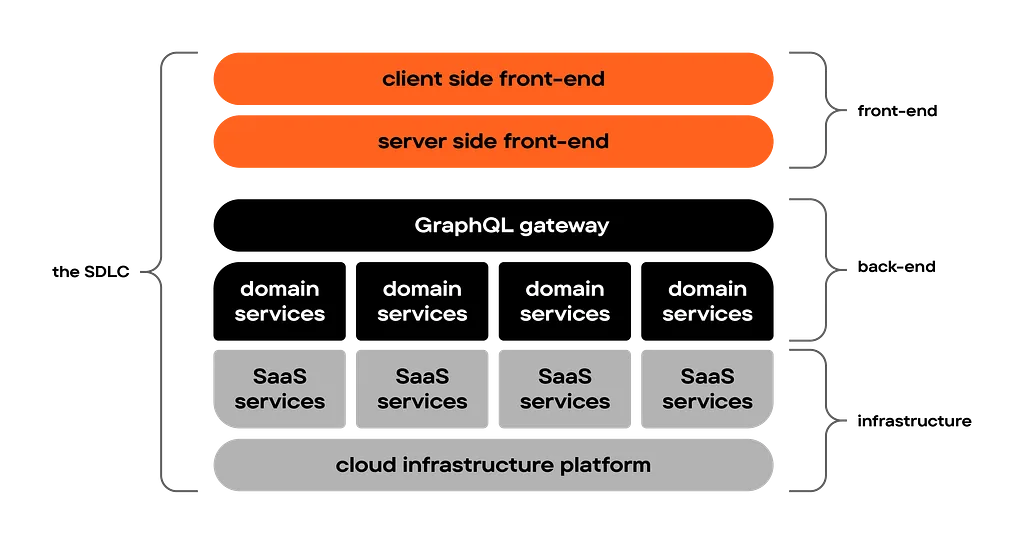
All of these systems work together to power a coherent and speedy user experience. And to get them to do so, they need to be orchestrated well and play in the same rhythm.
By having a strong front-end delivery platform (including a CDN) as well as an advanced middleware layer sitting on top of individual domain services, we have a great number of options available to build a high performance platform.
From static content generation to caching individual objects from back-end systems in the GraphQL middleware layer or in the front-end, leveraging the ability to parallelize requests where possible and using domain service-specific options can improve performance.
Front-end development has undergone a huge transformation over the last decade. Some will say we’ve gone ‘full circle’ with the focus on “doing all the work” on the server. Perhaps true, but there’s a lot more to it.
For a long time, rendering of the user experience took place on the server. Then it transitioned to the client, first by unlocking AJAX/XHR and then by building single page apps in the ‘React’-age on top of back-end APIs, which in turn unlocked much of the API-First and Headless based back-end platforms we work with today.
All of this had major performance implications, because suddenly we’re relying a lot on the performance of the users device, and the way that your front-end application interacts with APIs. In other words: a lot of complexity that was originally dealt with on the back-end, had now moved to the front-end. And over the past couple of years, a wide range of tools and frameworks have been created to solve this complexity.
With NextJS we can mix and match static content and dynamic personalised user experiences in the same page while still being highly performant. By leveraging streaming, the static parts of a site can be instantly shown to the user while the dynamic parts stream in from the server when available. This allows for instant feedback while not relying on individual devices to render out the personalised experience.
Core Web Vitals are the cornerstone of our performance optimization efforts. These metrics — Largest Contentful Paint (LCP), First Input Delay (FID), and Cumulative Layout Shift (CLS) — provide insights into loading performance, interactivity, and visual stability. Tools like Lighthouse are useful for tracking and improving these metrics, although should also be considered ‘lab settings’ rather than real user performance. For that you definitely need proper RUM tooling and observability.
Treating your website as predominantly static instead of the other way around is a good mindset for building a highly performant platform. In principle everything is static, unless it needs to be dynamic.
This sounds more static than it is. We want users to receive a static response from the server, but that doesn’t mean outdated. Implementing a proper revalidation strategy deservers a lot of attention. It results in a highly performing website served from caches as long as possible, but always revalidated once needed.
UI components implement both server-side and client side optimisations, ensuring that a component is delivered ‘pre-rendered’ to the client, and only ‘hydrated’ with dynamic functionality on the client when actually needed.
Where possible we use static pre-rendering of webpages whenever certain things change in the system. This can be triggered by for example deployments of the front-end of the platform, or by content changes in for example the CMS or the commerce engine, which can trigger regenerations through the use of Webhooks.
As you might know we use GraphQL to expose our back-end systems to the front-end. The next chapter describes how to build a highly performant GraphQL Gateway to power that.
From a front-end perspective, you need to carefully plan how to connect with this gateway and consume it’s data. Building the wrong queries might still lead to over fetching and sequential requests.
We apply so-called Relay-style GraphQL to prevent over-fetching data in our applications. In short, Relay-style GraphQL is a declarative data-fetching approach, where each UI component precisely defines its own data needs. This allows for efficient and targeted data retrieval, tailored to what each part of the user interface actually requires.
Optimising how a website is rendered in the browser is still a very important aspect of performance optimisation. A couple of examples of techniques we apply:
Optimising image delivery through CDNs, serving the right format and by lazy-loading in the client (so requesting them when they are shown in the window).
Allow the browser to pre-connect to and/or preload to important third party resources before the actual resource needs to be used.
Implement automated checks on the JavaScript bundles that we serve to our end users, e.g. warn when we exceed size thresholds.
Implementing proper loading states with reserved space, to prevent layout shifts.
Automated end to end tests that also check for errors that could lead to inefficient client rendering (like hydration issues).
Where possible we implement ‘out of order streaming’ with NextJS, which means that when individual components are ready, they can be rendered, and don’t have to wait for other components to be ready. For example this could mean that the product data can render before the menu is rendered, and vice versa. Implementing the entire front-end in a non-blocking way is essential to achieve this.
Steve Souders’ 12+ years old “performance golden rule” still holds true: 80–90% of the end-user response time is spent on the frontend.
That is, of course, when your back-end is able to respond fast. And this is where it might become difficult with MACH, because your back-end responses depend on numerous HTTP calls to both internal and external (SAAS) services.
From a back-end perspective, we believe that all back-end activity to render a page should be done within 200ms and ideally faster. And this includes the server-side rendering of a NextJS application. After that the browser will start rendering the page, which might take an additional second. But not much more than that.
If you’ve built your site primarily as a static site, this should be perfectly achievable. No databases or APIs are touched on initial page load — only after that, when the UI is made interactive (hydrated), back-end APIs are called.
So how can you ensure that your back-end performs consistently, while being in fact a composition of distributed domain and SAAS services.
We’ve written before about how to use GraphQL Federation in composable architectures. Basically it comes down to building individual domain services that each expose their GraphQL schema at /graphql. These services can in theory be consumed directly. However, we integrate these domain schemas into a single GraphQL Gateway, that becomes the central entry-point for consuming the composable application’s data.
For consuming clients, such as the front-end and mobile apps, this means there is a single entry-point to interact with the platform and allows them to craft single queries that collect data from multiple domain services.
As you can imagine, this brings many benefits in terms of security, authentication and documentation. But also by having a consistent method to build & expose domain services as well as performance optimisation: the Federation server will collect this data through finding the most optimal execution path (either parallelized, concurrently and where possible, from the cache).
GraphQL offers support for implementing server side caching at the field level. As you can see below, max-age cache durations are configured in the schema.
type ProductListingPage
  @extends
  @key(fields: "id storeContext { locale currency storeKey }")
  @cacheControl(maxAge: 3600) {
  id: ID!
  storeContext: StoreContext!
  categoryId: String @external
  productListingConfig: ProductListingConfig! @requires(fields: "categoryId")
}
type ProductListingConfig @cacheControl(maxAge: 3600) {
categoryId: String!
defaultOrder: ProductSortOrder
enabledFacets: [String!]
prefilters: [FilterCondition!]
}type ProductsResult @cacheControl(maxAge: 3600) {
total: Int!
results: [Product!]!
facets: [Facet!]
}When the GraphQL Federation Gateway imports these schemas from a number of domain services, and has a proper caching configuration set up, with for example Redis, the Federation server will automatically cache objects whenever they are requested.
So by properly designing and configuring your GraphQL schemas for domain services, you can ensure objects are resolved served from memory where possible, rather than going back to an origin-server or SAAS API.
As most of the data that needs to be sent to the user can be cached, we’ve seen a high caching hit ratio in our GraphQL API responses. And the cool thing is: at the same time, a response can contain both cached data as well as real-time data, like a users’ shopping cart or dynamic price based that’s personalised to them.
You can take caching a step further and use general purpose HTTP caches, usually implemented in CDNs to cache complete requests to the GraphQL gateway. This can be especially useful when the GraphQL API provides information that is practically static, such as menu structures, content, etc.
The enabler for this is APQ, or Automated Persisted Queries. Based on a hash the server is able to cache requests, and subsequent queries can use this hash to retrieve data via GET requests, which makes it possible to cache these using CDNs. This also means that the client doesn’t need to send full GraphQL queries to the server anymore, but can simply use the hash.
If configured well with cache-control headers, introducing a CDN as an additional caching layer can provide great performance benefits. On the other hand it does introduce another layer of complexity, which you might want to avoid and only use when really required. In most cases we can get away without this extra caching layer and simply use APQ ‘stand-alone’.
As you might know, there are only two hard problems in computer science: cache invalidation and naming things.
Which is why you should avoid caching where you can. If you can get away without caching, you absolutely should. But in many cases you can’t, as the UX will suffer from it too much.
So be prepared to fully and thoroughly understand and implement a cache invalidation strategy, next to your caching strategy. Each component will most likely required a different approach for this.
When it comes to invalidation, you usually want to explicitly invalidate objects from a cache at the moment the object changes, rather than waiting for a TTL to expire. This ensures that invalidations take place immediately when something changes and the user gets served the latest version in a performant way, and at the same time gives you the option to cache objects ‘forever’ until the are invalidated, which is great for performance.
Luckily, most SAAS solutions — in which content is usually stored — offer webhooks support for a large number of events in their systems. So when an object is changed and published, such as in below example with Storyblok, you can get it to notify you of it, after which you can start you cache invalidation process.
resource "storyblok_webhook" "invalidate" {  name
        = "content"  space_id
    = var.variables.storyblok_space_id  secret
      = random_password.webhook_secret.result  description = "Webhook to invalidate cache on content changes."  actions = [
    "story.moved",
    "story.unpublished",
    "story.deleted",
"story.published", ] endpoint = "https://cms.internal/api/webhook"}As we wrote above, caching is often considered a dirty word by MACH vendors. Surely their APIs don’t need caching, because they guarantee low latencies through an SLA.
But what is often missed is that a lot of data is needed from several systems to build even a single page. And that data needs to be fetched. Sometimes concurrently, but in many cases sequentially. And every fetch has latency.
This is why we beg to differ. Caching is an absolute necessity throughout the composable architecture and requires careful planning to get right.
And this can be implemented at several levels in the application; from the storefront storing requests to the API, the GraphQL gateway to store certain queries or objects, to in memory caching in individual domain services. And of course through caching capabilities that CDNs provide, both for assets as well as full pages.
Infrastructure is the provisioned hardware your workloads run on. So it’s an important aspect for a high performance MACH platform. Choosing the right workload runtimes, networks services and geographic locations can highly influence it.
Every workload you have should be deployed in a runtime that is fit for purpose. We’ve noticed over many deployments that for real time traffic, hosting in a docker container is almost always the best option, as it is easy to scale vertically and horizontally, and supports may concurrent requests with a single container.
We’ve run API endpoints in AWS Lambda and Azure Functions, but have seen many drawbacks in terms of performance. Both cold start problems as well as the fact that functions can only process one concurrent request, make them a less suitable option for real time services.
For asynchronous workloads though, Functions are often a great option, as their simple to deploy and scale and perfectly fit an event-driven approach to execution.
For front-end workloads you have the option to use either a docker container or use a specialised cloud like Vercel or Netlify. These platforms are relatively new in the cloud space and bring quite some benefits in terms of both hosting as well as developer experience.
Proper auto-scaling configurations at your cloud provider will ensure there is enough capacity to scale out when needed.
All of your endpoints can be served through a CDN to the end user. Whether it is static data from S3, an GraphQL endpoint or a fully rendered website. Everything can be served through CDNs and can be potentially cached there, not to mention the added protection against DDoS attacks.
This has the benefit of being extremely fast, as responses can be served from the cache, and very low latency, as CDN edge locations are close to the user.
Often CDNs allow for implementing simple workloads at the edge, which might be suitable for certain workloads.
Most of the SAAS services you depend on will be hosted in a public cloud and most likely in a single region you need to choose, across multiple availability zones that are relatively close to each other.
Therefore it’s important to choose the right location, both for your end-users as well as connecting to those SAAS services from your applications.
You can test latency to cloud providers for yourself with tools such as https://cloudpingtest.com/. But more importantly the latency between different cloud providers and their regions (i.e. AWS eu-west-1 to GCP europe-west-1) is important, as your workloads might be deployed in one, and a SAAS dependency in the other.
Understanding these latencies and the available regions, both for workloads and SAAS services, can significantly benefit your performance when you make the right decisions.
There is no substitute for real world traffic when it comes to performance. You can simulate it, but nothing beats real users discovering your platform from all around the world, all kinds of devices and all kinds of connections.
This is why having real time insights into your platform through traces, metrics and logs is vital to keep your platform highly performant and find potential bottlenecks quickly. We recommend implementing OpenTelemetry, which allows you to integrate most of the Observability tools out there, without changing your implementation.
In a distributed system this becomes harder, because a single user page view may touch many individual components that may behave unexpected. To prevent searching for a needle in a haystack, Observability solutions trace requests across all of these systems and surface bottlenecks to you, both around performance as well as error rates.
Digital commerce platforms are usually continuously developed by one or more development teams. If setup well, this might lead to multiple deployments per day, with changes to the platform.
These changes will affect performance. Maybe not in a big way, but they will. And enough small changes might lead to a decreasing trend in performance.
Through a proper continuous delivery pipeline we can catch many errors and regressions, including performance, before they end up in production. But not all of them, which is why a modern platform should be Observable.
Having real-time insight in your platform gives you the data to monitor performance trends, have anomalies alerted and gives you the data to fix potential bottlenecks.
Suffice to say, you don’t know how performant your site is if you don’t test for it. And not just once, but continuously in your CI/CD process.
This is food for another article, but to give you an idea of the techniques we apply regularly:
Real time performance of production environments using Observability instrumentation. Which is also a path to implementing progressive delivery using canary releasing and feature flags.
Continuous performance testing by simulating production traffic on your testing environments.
Pagespeed insights integration in PR pipelines to get immediate feedback on impact of the PR.
Regular load and performance testing directly against API endpoints, to test if latency stays low under high load as well.
These are just a couple of things we do in terms of performance testing and managing high performance of MACH sites. And again, this topic deserves a deep dive.
The most important thing is to stay disciplined and keep tabs on performance over time. We’ve seen many cases of performance that gradually deteriorates, which can be prevented by testing and monitoring it continuously.
To make a MACH platform perform well, we need to address this head on in all aspects of our platform and follow industry best practices. This is not specific to MACH, but applies to any modern distributed web application and the techniques you use are the same as well.
Your architecture should enable a high performance platform through decoupled layers that are standards based, scalable and can be optimised individually (i.e. caching at the GraphQL Federation layer).
The front-end needs to be built as a primarily statically rendered website that is made dynamic. It should incorporate client and server-side performance and rendering best practices.
Implementing your back-end API as a GraphQL Gateway gives you a great MACH integration approach that provides ample hooks for performance optimisation.
Through a solid caching & invalidation strategy (including CDN) you can achieve a situation where 99% of the content comes from a cache, but you never serve stale content.
You need to make the right infrastructure decisions, particularly workload runtime, but also the physical geographic location of your services.
Observability should be implemented end-to-end to see how your platform is performing and (miss)behaving in real time.
Testing should be applied regularly at multiple levels during all stages of your SDLC, including production.
In order to get all of this right, you need the right expertise in your team. For us as an agency, you can imagine these topics are important for each and every client we serve. And as you might also know, we don’t like reinventing the wheel, which is why we’ve been investing in our internal platforms for a long time, and have a standardised approach for building high performance MACH website with our platform Evolve, which incorporates many, if not all, of the practises we described in this article.
We believe that a solid strategy for creating high performance MACH sites will result in sites that are as fast or faster as any other site, while still managing complexity and being able to reap the benefits of a composable architecture.
About the author
Boris Besemer