Article

Designing a GraphQL supergraph your AI agents can safely use
By Seb Potter


Written by
Leon Graumans
Senior Software Engineer
How we turned our federated GraphQL API into a type-safe AI toolkit, and why persisted documents are the key to keeping it safe
Everyone's building MCP servers. But most implementations we've seen have the same problem: developers hand-write tool definitions, manually keep them in sync with their API, and end up with a fragile layer between the AI and the actual business logic.
We took a different approach. Our composable commerce platform already has a GraphQL Federation gateway as the single entry point to all backend microservices: catalog, checkout, orders, accounts. Every query and mutation is typed, documented, and validated. So instead of building MCP tools from scratch, we generate them from our GraphQL operations.
Adding a new tool for an AI assistant is now a one-line directive. The codegen pipeline handles type conversion, input validation schemas, and persisted document hashing. And because the AI can only execute pre-registered queries, we get the same level of control we have over our frontend clients.
We've open-sourced the codegen tooling as graphql-codegen-mcp-tools. Clone the repo, point it at your schema, and you're up and running.
The techniques outlined in this article are based on our implementation of MCP support in our Evolve Platform. Evolve uses it to build end to end Agentic Commerce agents that shop on behalf of the user, or automate flows that were previously manual. For more information about Evolve and it's MCP support, have a look at the Evolve's MCP documentation pages.
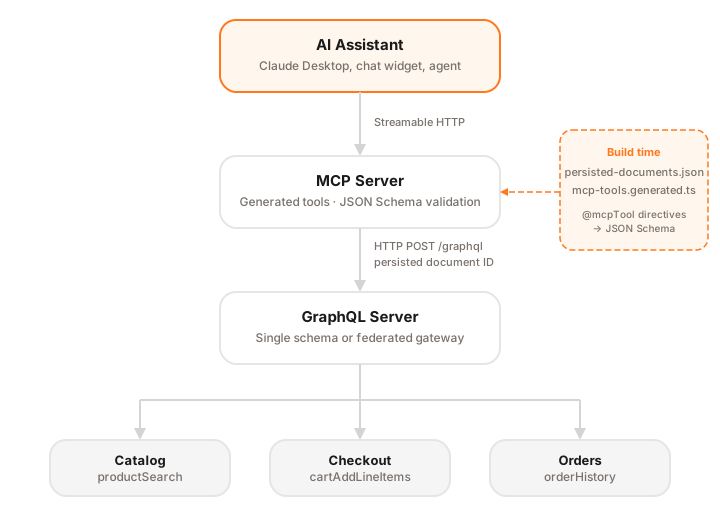
The MCP service sits in front of the same GraphQL server your frontend uses. No special access, no backdoors. It sends the same persisted queries, authenticated through the same token system. The AI is just another client, one that happens to speak MCP instead of HTTP.
Two custom GraphQL directives (see src/directives.graphql):
directive @mcpTool(
  description: String!
  exclude: Boolean = false
) on QUERY | MUTATION

directive @mcpToolVariable(description: String) on VARIABLE_DEFINITION
@mcpTool marks an operation as something an AI assistant can call. The description becomes the tool description the LLM sees, so write it accordingly. The exclude flag is for operations that need to exist in the codebase but shouldn't be exposed as tools (more on that later).
@mcpToolVariable overrides or adds descriptions to individual variables. The LLM needs clear descriptions to know what values to pass, and these can (and should) be different from your schema docs.
Both directives are defined in a .graphql file that you feed to codegen alongside your schema. The document transform strips them from the AST during codegen, so persisted documents and generated tool definitions contain only server-executable GraphQL.
You write standard GraphQL operations and annotate them. The repo has a complete example with five operations, here's one:
query GetProducts(
  $sort: ProductSortOrder!
    @mcpToolVariable(description: "Sort order, e.g. 'relevance'")
  $filters: [FacetFilterInput!]
    @mcpToolVariable(description: "Filters like category or brand")
  $searchTerm: String @mcpToolVariable(description: "Free-text search query")
  $pageSize: Int!
    @mcpToolVariable(description: "Number of products per page, e.g. 24")
  $page: Int! @mcpToolVariable(description: "Page number, starting at 1")
) @mcpTool(description: "Search products with filters and sorting") {
  productSearch(
    sort: $sort
    filters: $filters
    searchTerm: $searchTerm
    pageSize: $pageSize
    page: $page
  ) {
    total
    results {
      slug
      name
      variant {
        sku
        name
        availability
        price {
          gross {
            centAmount
            currency
          }
        }
      }
    }
    facets {
      key
      label
      options {
        key
        label
        count
      }
    }
  }
}
The variable descriptions are written for the AI, not for developers. You're telling the model things like "First call get_cart to get this ID" or "Each item requires 'sku' and 'quantity'." Prompt engineering, embedded in your schema:
mutation AddToCart(
  $cartId: ID!
    @mcpToolVariable(
      description: "Cart ID. Call get_cart first to retrieve this."
    )
  $lineItems: [CartLineItemInput!]!
    @mcpToolVariable(
      description: "Items to add. Each needs 'sku' and 'quantity'."
    )
)
@mcpTool(
  description: "Add products to the cart. Call get_cart first to get the cart ID."
) {
  cartAddLineItems(cartId: $cartId, lineItems: $lineItems) {
    cart {
      id
      lineItems {
        id
        quantity
        variant {
          sku
          name
        }
      }
    }
    errors
  }
}
These descriptions guide the LLM to call tools in the right order with the right arguments. And they live next to the operations they describe, not scattered across your application code.
We use GraphQL Code Generator with a custom document transform and plugin, both included in graphql-codegen-mcp-tools. The pipeline does three things:
Filter — A document transform walks your operations and keeps only the ones marked @mcpTool, along with any fragments they depend on. Everything else is discarded. Your operations.graphql can mix tool-exposed operations with internal ones (token refresh, session management) — only @mcpTool operations make it through.
Strip — The same transform removes @mcpTool and @mcpToolVariable directives from the AST before output. The persisted documents that come out are plain GraphQL your server can execute directly, no custom directives attached.
Convert — A tools plugin reads the persisted documents and your schema, then converts each operation into an MCP tool definition. GraphQL types map to JSON Schema: enums become { type: "string", enum: [...] } with their descriptions, input objects become nested { type: "object", properties: {...} }, lists become { type: "array", items: {...} }. The LLM gets a validated schema for every tool input, so it stops making up argument values.
The codegen produces two artifacts. First, persisted-documents.json, a hash-to-query mapping with clean, directive-free queries:
{
  "f8567d7e...": "query GetProducts($filters: [FacetFilterInput!], $page: Int!, ...) { ... }",
  "8a7edd50...": "mutation AddToCart($cartId: ID!, $lineItems: [CartLineItemInput!]!) { ... }"
}
Second, mcp-tools.generated.ts with typed tool definitions. This is what the GetProducts operation turns into:
export const generatedMcpTools: GeneratedMCPTool[] = [
  {
    name: "get_products",
    description: "Search products with filters and sorting",
    operationType: "query",
    inputSchema: {
      type: "object",
      properties: {
        sort: {
          type: "string",
          enum: ["relevance", "price_asc", "price_desc", "name_asc"],
          description: "Sort order, e.g. 'relevance'",
        },
        searchTerm: {
          type: "string",
          description: "Free-text search query",
        },
        pageSize: {
          type: "integer",
          description: "Number of products per page",
        },
        page: { type: "integer", description: "Page number, starting at 1" },
      },
      required: ["sort", "pageSize", "page"],
    },
    documentId: "f8567d7e...",
    queryString: "query GetProducts($sort: ProductSortOrder!, ...) { ... }",
  },
  // ... more tools
];
Tool names are derived from operation names (GetProducts → get_products). Descriptions come from the directive. The documentId is the persisted document hash for registry lookups at runtime, and queryString is the full query with MCP directives stripped out. The source code for the document transform, tools plugin, and type resolver is all in the repo if you want the details.
At runtime, each generated tool needs a GraphQLExecutor: a function that sends queries to your GraphQL server and returns the result.
The executor is the only part that's specific to your infrastructure:
import type { GraphQLExecutor } from "./src/runtime/index.js";

const executor: GraphQLExecutor = async (query, variables, documentId) => {
  const res = await fetch("http://localhost:4000/graphql", {
    method: "POST",
    headers: { "Content-Type": "application/json" },
    // Option A: send just the persisted document ID (recommended)
    body: JSON.stringify({ documentId, variables }),
    // Option B: send the full query string (simpler setup)
    // body: JSON.stringify({ query, variables }),
  });
  const { data, errors } = await res.json();
  if (errors?.length) throw new Error(JSON.stringify(errors));
  return data;
};
The executor receives the query string, the variables the LLM provided, and the documentId. If your GraphQL server supports persisted documents, you can send just the documentId instead of the full query string. Unknown hashes get rejected, which is exactly the point.
The example server runs a stateless Streamable HTTP server. Each incoming request gets a fresh McpServer instance, no session state to manage:
import { createServer } from "node:http";
import { McpServer } from "@modelcontextprotocol/sdk/server/mcp.js";
import { StreamableHTTPServerTransport } from "@modelcontextprotocol/sdk/server/streamableHttp.js";
import { createToolFromGenerated } from "./src/runtime/index.js";
import { generatedMcpTools } from "./generated/mcp-tools.generated.js";

function createMcpServer(): McpServer {
  const server = new McpServer({ name: "my-graphql-mcp", version: "0.1.0" });

  const tools = generatedMcpTools.map((t) =>
    createToolFromGenerated(t, executor),
  );

  for (const tool of tools) {
    server.tool(
      tool.name,
      tool.description,
      tool.inputSchema,
      async (args) => ({
        content: [
          {
            type: "text",
            text: JSON.stringify(await tool.handler(args), null, 2),
          },
        ],
      }),
    );
  }

  return server;
}

const httpServer = createServer(async (req, res) => {
  const server = createMcpServer();
  const transport = new StreamableHTTPServerTransport({
    sessionIdGenerator: undefined, // stateless
  });

  await server.connect(transport);
  await transport.handleRequest(req, res);
  res.on("close", () => {
    transport.close();
    server.close();
  });
});

httpServer.listen(3001);
To connect from Claude Desktop, run the MCP server and then expose it over HTTPS via ngrok:
pnpm example
ngrok http 3001
Copy the https://... forwarding URL from ngrok and set it in Claude Desktop as a Remote MCP server.
Setup guide: Get started with custom connectors using remote MCP
The example in the repo includes a mock executor that returns realistic product and cart data, so you can test the full flow (codegen, server startup, tool execution) without starting up a GraphQL backend.
Giving an AI access to your APIs raises an obvious question: how do you stop it from doing things it shouldn't? Hand-written MCP tools tend to push that problem into application code, ad-hoc checks scattered across handlers. We wanted something more systematic. The GraphQL codegen approach gives us multiple layers of control, and they compound.
The codegen generates persisted-documents.json with a hash-to-query mapping. If you register these with your GraphQL server's operation registry, the AI can only execute queries that were approved at build time.
Most GraphQL servers support some form of this. GraphQL Hive has a persisted documents feature, Apollo Server has operation safelisting, and you can build a simple custom check that validates incoming document IDs against a known set. The approach is the same regardless: at deploy time, register the hashes from persisted-documents.json. At runtime, reject anything not in the list.
We use the same mechanism for our storefront frontend. Same security posture for AI clients as for web clients.
You can also validate persisted documents against your schema in CI. If a schema change breaks an MCP tool's query, the build fails before it reaches production. In pseudocode:
for each (hash, query) in persisted-documents.json:
  parse query against current schema
  if validation errors:
fail CI with error detailsYou control what data the AI sees by crafting your selection sets. A GetProducts query for the AI doesn't need internal pricing tiers, margin data, or supplier information. Just don't select those fields. The operation in operations.graphql is your contract with the AI.
exclude flagSome operations need to exist in the codebase for token refresh or session management but should never show up as MCP tools:
mutation RefreshToken
@mcpTool(description: "Internal token refresh", exclude: true) {
  refreshToken {
    accessToken
  }
}
The codegen skips exclude: true operations in the tool output while still including them in persisted documents for internal use.
The MCP service authenticates against your GraphQL server the same way your frontend does. JWT tokens, API keys, or session cookies, passed as headers in the executor.
For rate limiting, apply limits per MCP session to prevent runaway loops. If you're running the MCP server over HTTP (Streamable HTTP transport), you can use the Mcp-Session-Id header as the rate limit key.
If your backend uses Apollo Federation or any other federation approach, the MCP service doesn't care which microservice handles a given query. Everything goes through the gateway:
productSearch → Catalog service
cartAddLineItems → Checkout service
customer.orders → Order service
A single MCP service covers your entire domain. Want to expose something from a new service? Add an operation to operations.graphql and run codegen. The federated supergraph schema feeds the SchemaTypeResolver, so enum values, input types, and descriptions all come straight from the source services.
Non-federated? Same deal. Point your schema config at a single schema file or introspection endpoint instead of a supergraph.
Clone the graphql-codegen-mcp-tools repo and run the example:
git clone https://github.com/labd/graphql-codegen-mcp-tools.git
cd graphql-codegen-mcp-tools
pnpm install
pnpm codegen
pnpm example
The example server starts with mock data, no backend required. Open the MCP Inspector or add the printed config to Claude Desktop and call a few tools to see it work.
To point it at your own schema:
Replace example/schema.graphql with your schema (or point codegen at an introspection endpoint).
Write your operations.graphql. Annotate with @mcpTool and write variable descriptions aimed at the LLM.
Update codegen.ts to point at your schema and operations files. See example/codegen.ts for reference.
Run pnpm codegen to generate persisted documents and tool definitions.
Replace the mock executor in server.ts with a GraphQLExecutor that fetches from your GraphQL endpoint.
Optionally, register persisted-documents.json with your GraphQL server's operation registry so only known queries can execute.
One definition drives everything. The GraphQL operation is the tool. Its types become the JSON Schema the LLM validates against. Its persisted document hash is the allowlist entry your server enforces. No separate tool layer to maintain.
We built this for e-commerce, but the pattern doesn't care about your domain. A CMS, an internal dashboard, a logistics backend. Any GraphQL API works. The operations you'd write for MCP are the same ones you'd write for a React app or a mobile client. You're just choosing which subset the AI gets.
What we like about this setup is that the decisions are explicit and reviewable. operations.graphql is both the implementation and the documentation. When someone asks "what can the AI do?", you point them at that file and the persisted documents it produces. Compare that to hand-written tool handlers where the answer requires reading through every handler, checking what each one calls, and hoping nothing was missed.
Adding a new tool is cheap. Write the operation, annotate it, run codegen. The JSON Schema, the persisted document hash, the type-safe handler: all generated. Removing a tool is deleting the operation and running codegen again. That low friction matters because you'll want to iterate on what the AI can do as you learn what works in practice.
We started with product search and cart operations. But the pipeline doesn't stop there. Order management, customer service lookups, inventory checks, returns. Stack enough of those together and you're not building a demo anymore. You're building a customer service agent that operates through the same governed channel as your storefront.
That's where agentic workflows come in. An AI plans a multi-step process: find product, check availability, apply discount, add to cart. Each step is a validated, allowlisted GraphQL operation. It can chain them freely because the schema constrains what's possible and the allowlist constrains what's permitted. No risk of it constructing arbitrary queries.
If you're running a federated architecture, there's an ownership angle too. Different teams own different subgraphs. Each team writes and maintains their own MCP operations against their slice of the schema. The codegen sees the composed supergraph. It doesn't care where the types come from. Scaling this across an organization follows the same model you already have for your GraphQL services. No central MCP team required.
Production MCP is still new ground. We'd rather build on type safety and build-time validation now than bolt them on later. The codegen handles the tedious parts; you handle the decisions about what to expose.
Code is at graphql-codegen-mcp-tools.